Listing Indicators
Indicator Listing
The "Indicator Listing" page displays all the Indicators associated with your projects in the M&E Monitor. It provides a comprehensive view of each Indicator's progress, status, and key metrics, allowing users to quickly assess project performance. Users can filter, sort, and search through the Indicators to find specific information, making it easier to monitor and manage their evaluation efforts.
Indicators status key
The Indicator Status Key helps users understand the different stages an indicator can be in within the M&E Monitor. Each status represents a specific phase in the lifecycle of an indicator, providing insight into its current state and how it is being managed. The status key also shows the number of indicators currently assigned to each status.
Statuses Overview
The statuses available for indicators are:
- Draft
- Review
- Public
- Archived
Each status is explained below:
Draft
- Description: The indicator is in its initial stage of creation and has not yet been finalized. It may be incomplete or still under development.
- Use Case: Users can create and modify the indicator freely before submitting it for review.
- Indicator Count: Displays the number of indicators currently marked as
Draft.
Review
- Description: The indicator has been completed and is now undergoing a review process. It may need approval or validation before being published.
- Use Case: Use this status when an indicator is awaiting feedback from stakeholders or a supervisor. It helps ensure the quality and accuracy of the indicator.
- Indicator Count: Shows the number of indicators awaiting
review.
Public
- Description: The indicator is approved and has been published. It is now accessible for monitoring, tracking, and reporting.
- Use Case: Once an indicator is verified and ready for implementation, it is set to "Public" to indicate it is actively being used for monitoring and evaluation.
- Indicator Count: Indicates the number of indicators currently marked as
Public.
Archived
- Description: The indicator is no longer active and has been moved to an archive for historical reference. It is not included in active monitoring.
- Use Case: Use this status for indicators that are completed, inactive, or retired. Archiving helps keep the system organized while preserving historical data.
- Indicator Count: Shows the number of indicators that have been
archived.
Example Status Key Display
The status key may look something like this:
- Draft (10 indicators)
- Review (0 indicators)
- Public (0 indicators)
- Archived (7 indicators)

This format helps users quickly see how many indicators fall under each status category.
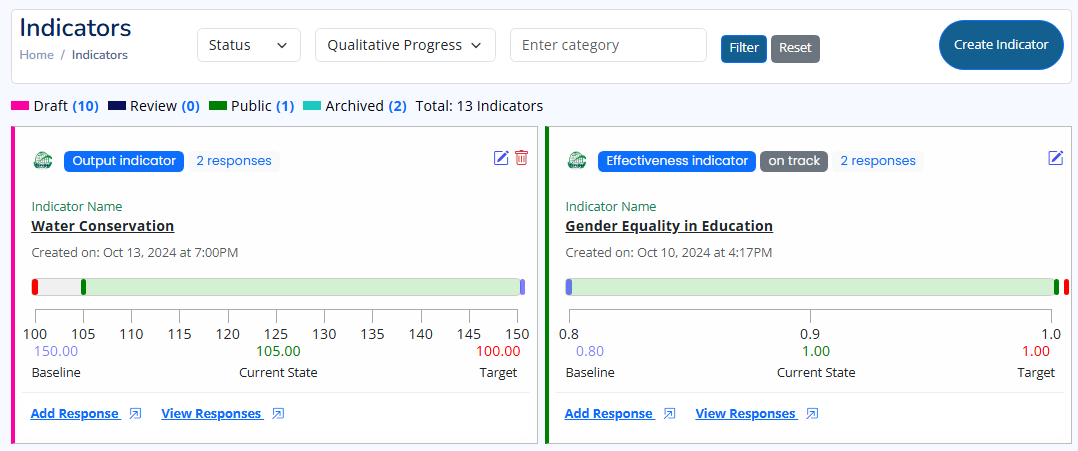
Graphical View of Indicator Listing
Filtering Indicators
The "Indicator Listing" page allows you to filter Indicators based on various criteria, enabling more efficient monitoring and evaluation. The available filters include Status, Qualitative Progress, and Categories. You can use each filter individually or combine them for a more refined search.
Filtering by Status
Filter Indicators based on their current status. The available statuses are:
- Draft: Indicators that are still being worked on and not yet ready for review.
- Review: Indicators that are under review and awaiting approval.
- Public: Indicators that have been approved and published for general access.
- Archived: Indicators that are no longer active but retained for reference.
Filtering by Qualitative Progress
This filter allows you to assess the qualitative progress of each Indicator. The options are:
- On Track: Indicators progressing as expected toward the set targets.
- At Risk: Indicators showing signs of potential delays or issues.
- Off Track: Indicators that have deviated significantly from the expected progress.
- Completed: Indicators where all objectives have been met and targets achieved.
- Not Started: Indicators where no measurable progress has been made.
Filtering by Categories
Categorize and filter Indicators based on their type. Categories help organize Indicators by their nature, making it easier to track different types of goals. The available categories include:
- Outcome: Indicators measuring the long-term effects or changes resulting from the project.
- Output: Indicators tracking the immediate products, services, or results delivered by the project.
- Impact: Indicators assessing the broader, long-term impact of the project on the target population or environment.
- Input: Indicators tracking the resources invested, such as time, money, or materials used for the project.
- Process/Activity: Indicators monitoring the steps taken or activities conducted to achieve the project's objectives.
- Efficiency: Indicators evaluating the relationship between the inputs used and the outputs produced.
- Effectiveness: Indicators measuring how well the project's outputs achieve the intended outcomes.
- Sustainability: Indicators that assess the likelihood of the project’s benefits continuing after the project's end.
- Equity: Indicators examining the fairness and inclusiveness of the project's impact across different groups.
- Cross-Cutting or Context: Indicators related to broader issues that influence the project's outcomes, such as gender, climate change, or political context.
- Uncategorized: Indicators that do not fit into any of the above categories or have not yet been assigned a category.
Combining Filters
You can apply multiple filters simultaneously to narrow down the list of Indicators. For example, filtering by Status: Public, Qualitative Progress: On Track, and Category: Outcome will show all public outcome Indicators that are progressing as expected.